






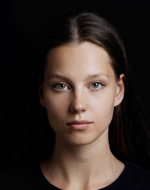
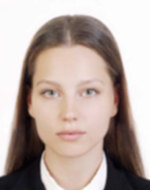
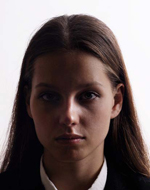
Residence Card Photo app icon

Residence Card Photo

Create submission photos for residence procedures

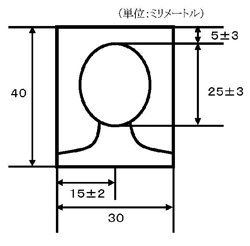
Based on Immigration Services Agency of Japan photo guidance, the app helps you prepare a 40 mm x 30 mm submission photo on your iPhone. You can save both a print-ready layout and a JPEG that is easier to attach to online procedures from the same adjustment result.

Download on the App Store

Key features

40 mm x 30 mm guidance

Face positioning guidance helps you align a submission photo used in residence card related procedures.

Two save options

Save both a print layout and a JPEG for online submission from the same edit result.

Convenience store printing

Export an L-size print layout and review store-specific printing steps before uploading it to each service.

On-device processing

Photo import, face detection, adjustments, and export stay on your iPhone. Photo contents are not sent to the developer server.

JPEG for online submission

Save a JPEG that is easier to attach to online procedures. Final requirements still depend on the exact procedure.

Pre-submission checks

The app reminds you to review basics such as recency, plain background, no hat, and overall clarity before submission.

Pricing

Export plan

¥500

One export

  • Print-ready layout
  • JPEG for online attachment
  • 180-day re-export support

Photo checklist

A photo can be rejected even if it is only slightly outside the official guidance. Please check the points below before you save or submit it.

  • Use a 40 mm x 30 mm photo with only the applicant in the frame.
  • Use a photo taken within the last 6 months. Face the camera and do not wear a hat.
  • Use a plain background with no shadow behind you.
  • Make sure your full face and eyes are clearly visible. Avoid masks, hair covering the eyes, and glasses glare.
  • Do not use beauty filters, strong retouching, or mirrored images that change how you look.

Size and OK examples

These are the official size guide and acceptable sample photos. Keep the face position and margins close to this balance.

Size and OK examples

Source: Immigration Services Agency of Japan, "Photo requirements"

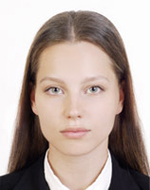
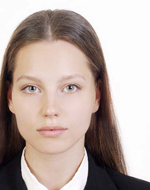
Examples that are OK

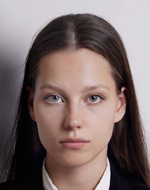
The person faces forward, the background is plain, and the face is clear.

Acceptable photo example 1
Forward-facing with a simple background.
Acceptable photo example 2
The face is clear and there is no strong shadow.

Common examples that are not OK

These are common reasons a photo may be rejected.

Off-center photo
The face is too far from the center.
Photo with shadow on the background
A background shadow makes the outline harder to see.
Side-facing photo
Use a photo where the applicant faces the camera.
Tilted face or body photo
Tilted posture can easily fall outside the required guidance.
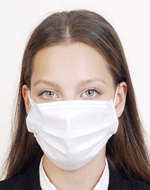
Photo with a mask covering part of the face
Part of the face is hidden by a mask.
Photo with glasses frame over the eyes
Make sure the glasses frame does not overlap the eyes.
Photo with very thick glasses frame
Avoid glasses that make the eye area hard to see.
Photo with glare on glasses
Reflections can make the eye area difficult to see.
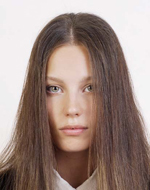
Photo with hair covering the eyes
Hair covers the eyes.
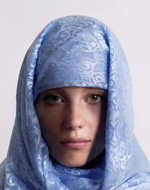
Photo with cloth or shadow covering the face
Even when covering is necessary, the face still needs to be clearly visible.
Photo with unnatural expression
Avoid expressions that look very different from your usual appearance.
Photo with background too dark
A dark background can make the outline harder to identify.
Blurred photo
The photo is blurry or shaky.
Photo with shadow on the face
Strong shadows can make facial features harder to confirm.

About editing

The Immigration Services Agency says photos are not acceptable if editing makes the eyes look larger, applies strong skin whitening, changes facial parts, removes moles or wrinkles, or mirrors the image. If you print and attach the photo separately, your procedure may also require your name on the back.

Official guidance Open Immigration Services Agency of Japan "Photo requirements"

FAQ

What are the photo specifications for residence card procedures?

The photo must be 40 mm tall x 30 mm wide, taken within the last 6 months, with the applicant facing forward, no hat, plain background, and a clear image. The face from the top of the head to the chin should fit properly in the photo with appropriate spacing between the eyes.

Which procedures can I use this app for?

The app helps create submission photos for applications involving residence card issuance (period extension, change of status, permanent residence application, etc.), re-issuance applications, and status change applications. Document requirements including photos vary by procedure, so please check the latest Immigration Services Agency guidance before applying.

Who can submit photos without a photo?

Some procedures may not require photos for applicants under 16 years old. Online guidance also includes information about placeholder data for applicants who do not need a face photo, so please confirm the specific procedure requirements. From June 14, 2026, photos will be displayed on residence cards for applicants aged 1 and older.

Can anyone use online application?

No. Eligibility for online application depends on the applicant's role, age, and procedure type. There are age-based restrictions for applications filed by the foreign national themselves, and only certain procedures are supported. Also, the Online Application System for Residence Procedures does not accept Special Residence Card issuance applications. Please check the official guidance beforehand.

What photos are considered 'inappropriate'?

The Immigration Services Agency of Japan specifies the following as inappropriate: photos that do not meet the specified dimensions or standards, photos with part of the face hidden (masks, cloth, etc. - except for religious or medical reasons with a statement form submitted), photos that make it difficult to identify the person, photos that have been digitally processed to enlarge eyes, apply skin whitening, or modify facial features, and mirrored photos.

What should I watch for regarding hair and glasses?

Avoid submitting photos where bangs cover the eyes. When wearing glasses, make sure the frames do not overlap the eyes, and avoid frames that are very thick or have reflections that make the eye area difficult to see.

Does the app guarantee acceptance?

No. The app helps you prepare a submission photo, but it does not guarantee acceptance. The final decision is made by the Immigration Services Agency of Japan or the relevant office.

Are my photos uploaded to a server?

No. Importing photos, face detection, background adjustments, and export generation all happen on your iPhone. Purchases use Apple's StoreKit, but photo data is not part of payment processing.

Can I print or re-export later?

Yes. The app can save an L-size print layout and shows printing guidance inside the app. Re-export availability depends on the purchase option and the data still stored on your device.

What is a Special Residence Card? How is it different from a regular residence card?

From June 14, 2026, Special Residence Cards (residence cards with MyNumber card functionality integrated) will become available. Obtaining a Special Residence Card is optional, and you can continue to hold both a regular residence card and a MyNumber card separately.

在留カード写真を今すぐ作る

撮影・確認は無料です。

App Store からダウンロード(無料)

Need help?

Contact us about usage, exports, purchases, or website information.